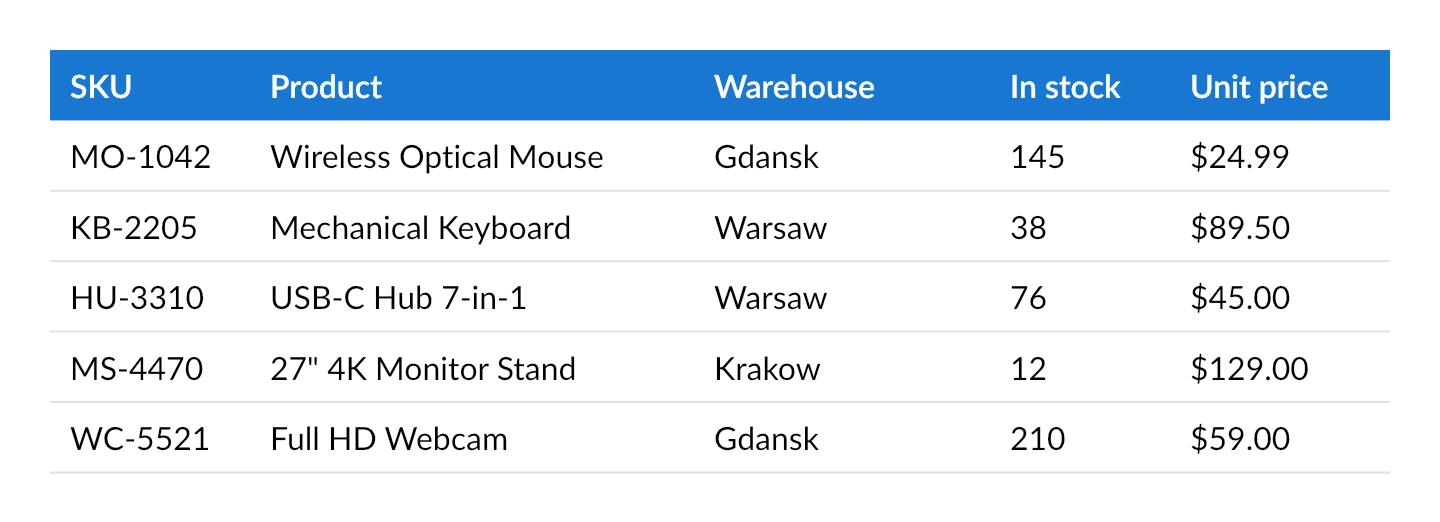
Dynamic composition: configurable tables
Sometimes not only the data but also the structure of a document is determined at runtime. Typical examples include user-configurable reports where each customer selects which columns to display, report templates stored in a database, or generic export features.
Because the QuestPDF Fluent API is executed as ordinary C# code, table columns, headers and cells can all be generated with loops based on an external configuration. In the following example, both the column definitions and the row data are provided as plain collections that could originate from any source.
Report configuration
Each column is described by its header text, sizing strategy and the name of the property that provides cell values:
csharp
public sealed record ReportColumn(
    string Header,
    bool IsConstantWidth,
    float Size,
    string PropertyName);
For this example, the configuration is defined directly in code. In a real application, it could just as well be deserialized from JSON, loaded from a database, or built from user preferences.
csharp
var reportColumns = new List<ReportColumn>
{
    new(Header: "SKU",        IsConstantWidth: true,  Size: 100, PropertyName: "sku"),
    new(Header: "Product",    IsConstantWidth: false, Size: 3,   PropertyName: "name"),
    new(Header: "Warehouse",  IsConstantWidth: false, Size: 2,   PropertyName: "warehouse"),
    new(Header: "In stock",   IsConstantWidth: true,  Size: 90,  PropertyName: "stock"),
    new(Header: "Unit price", IsConstantWidth: true,  Size: 110, PropertyName: "price")
};
The row data is kept as dictionaries rather than a fixed class, so cell values can be accessed by property name:
csharp
var products = new List<Dictionary<string, string>>
{
    new() { ["sku"] = "MO-1042", ["name"] = "Wireless Optical Mouse", ["warehouse"] = "Gdansk", ["stock"] = "145", ["price"] = "$24.99" },
    new() { ["sku"] = "KB-2205", ["name"] = "Mechanical Keyboard",    ["warehouse"] = "Warsaw", ["stock"] = "38",  ["price"] = "$89.50" },
    new() { ["sku"] = "HU-3310", ["name"] = "USB-C Hub 7-in-1",       ["warehouse"] = "Warsaw", ["stock"] = "76",  ["price"] = "$45.00" },
    new() { ["sku"] = "MS-4470", ["name"] = "27\" 4K Monitor Stand",  ["warehouse"] = "Krakow", ["stock"] = "12",  ["price"] = "$129.00" },
    new() { ["sku"] = "WC-5521", ["name"] = "Full HD Webcam",         ["warehouse"] = "Gdansk", ["stock"] = "210", ["price"] = "$59.00" }
};
Composition
The table is generated entirely from the configuration. The ColumnsDefinition call chooses between constant and relative sizing for each column, the header row is created with a loop, and each cell reads its value by property name.
csharp
container.Table(table =>
{
    table.ColumnsDefinition(columns =>
    {
        foreach (var column in reportColumns)
        {
            if (column.IsConstantWidth)
                columns.ConstantColumn(column.Size);
            else
                columns.RelativeColumn(column.Size);
        }
    });

    table.Header(header =>
    {
        foreach (var column in reportColumns)
            header.Cell().Element(HeaderCellStyle).Text(column.Header);

        static IContainer HeaderCellStyle(IContainer container)
        {
            return container
                .Background(Colors.Blue.Darken2)
                .DefaultTextStyle(x => x.FontColor(Colors.White).SemiBold())
                .PaddingVertical(8)
                .PaddingHorizontal(10);
        }
    });

    foreach (var product in products)
    {
        foreach (var column in reportColumns)
            table.Cell().Element(CellStyle).Text(product.GetValueOrDefault(column.PropertyName));
    }

    static IContainer CellStyle(IContainer container)
    {
        return container
            .BorderBottom(1)
            .BorderColor(Colors.Grey.Lighten2)
            .PaddingVertical(8)
            .PaddingHorizontal(10);
    }
});