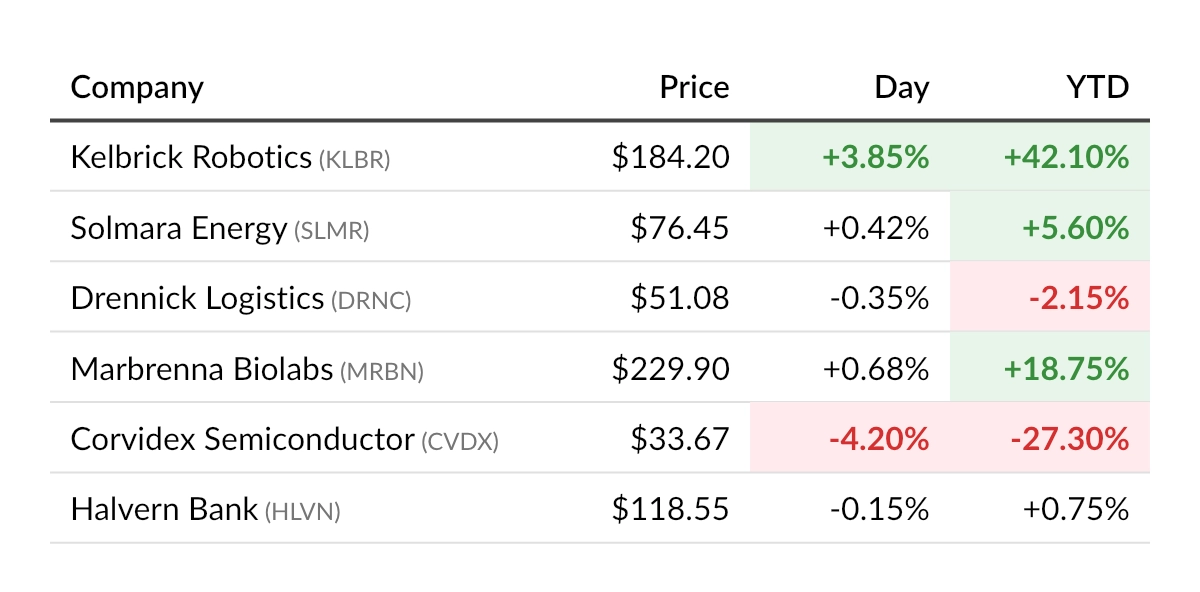
Dynamic composition: conditional formatting
In many reports, the appearance of content depends on the data itself. A financial summary may highlight losses in red, a monitoring report may flag measurements that exceed a threshold, and a scorecard may color-code performance levels.
Because QuestPDF describes documents with plain C# code, such formatting rules are just ordinary methods that inspect a value and apply the appropriate styles. The following example implements a stock listing where significant price changes are highlighted with color.
Data model
The table displays a collection of stock quotes:
csharp
public sealed record StockQuote(
    string Company,
    string Ticker,
    decimal Price,
    decimal DailyChange,
    decimal YearToDateChange);
csharp
var quotes = new List<StockQuote>
{
    new("Kelbrick Robotics", "KLBR", 184.20m, 3.85m, 42.10m),
    new("Solmara Energy", "SLMR", 76.45m, 0.42m, 5.60m),
    new("Drennick Logistics", "DRNC", 51.08m, -0.35m, -2.15m),
    new("Marbrenna Biolabs", "MRBN", 229.90m, 0.68m, 18.75m),
    new("Corvidex Semiconductor", "CVDX", 33.67m, -4.20m, -27.30m),
    new("Halvern Bank", "HLVN", 118.55m, -0.15m, 0.75m)
};
Styling rules
The following helper method receives a container along with the percentage change, and applies a background and text style only when the change is significant. For values between -1% and +1%, the container is returned unchanged.
Please note that the text style is applied with the DefaultTextStyle method on the container level, so it automatically propagates to all text inside the cell.
csharp
private static IContainer PriceChangeHighlightStyle(IContainer container, decimal changeInPercent)
{
    if (changeInPercent > 1m)
    {
        return container
            .Background(Colors.Green.Lighten5)
            .DefaultTextStyle(x => x.FontColor(Colors.Green.Darken2).Bold());
    }

    if (changeInPercent < -1m)
    {
        return container
            .Background(Colors.Red.Lighten5)
            .DefaultTextStyle(x => x.FontColor(Colors.Red.Darken2).Bold());
    }

    return container;
}

private static string FormatChange(decimal changeInPercent)
{
    return changeInPercent.ToString("+0.00;-0.00;0.00", CultureInfo.InvariantCulture) + "%";
}
Composition
Within the table, the conditional styling is applied with the Element method. Multiple Element calls can be chained: the first one applies the value-based style, while the second one applies the standard cell style shared by all cells.
csharp
container.Table(table =>
{
    table.ColumnsDefinition(columns =>
    {
        columns.RelativeColumn();
        columns.ConstantColumn(100);
        columns.ConstantColumn(100);
        columns.ConstantColumn(100);
    });

    table.Header(header =>
    {
        header.Cell().Element(HeaderCellStyle).Text("Company");
        header.Cell().Element(HeaderCellStyle).AlignRight().Text("Price");
        header.Cell().Element(HeaderCellStyle).AlignRight().Text("Day");
        header.Cell().Element(HeaderCellStyle).AlignRight().Text("YTD");

        static IContainer HeaderCellStyle(IContainer container)
        {
            return container
                .ZIndex(1)
                .BorderBottom(2)
                .BorderColor(Colors.Grey.Darken3)
                .DefaultTextStyle(x => x.SemiBold())
                .PaddingVertical(8)
                .PaddingHorizontal(10);
        }
    });

    foreach (var quote in quotes)
    {
        table.Cell().Element(CellStyle).Text(text =>
        {
            text.Span(quote.Company);
            text.Span($" ({quote.Ticker})").FontSize(12).FontColor(Colors.Grey.Darken1);
        });

        table.Cell().Element(CellStyle).AlignRight()
            .Text(quote.Price.ToString("$#,##0.00", CultureInfo.InvariantCulture));

        table.Cell()
            .Element(cell => PriceChangeHighlightStyle(cell, quote.DailyChange))
            .Element(CellStyle)
            .AlignRight()
            .Text(FormatChange(quote.DailyChange));

        table.Cell()
            .Element(cell => PriceChangeHighlightStyle(cell, quote.YearToDateChange))
            .Element(CellStyle)
            .AlignRight()
            .Text(FormatChange(quote.YearToDateChange));
    }

    static IContainer CellStyle(IContainer container)
    {
        return container
            .BorderBottom(1)
            .BorderColor(Colors.Grey.Lighten2)
            .PaddingVertical(8)
            .PaddingHorizontal(10);
    }
});